Click to go to:
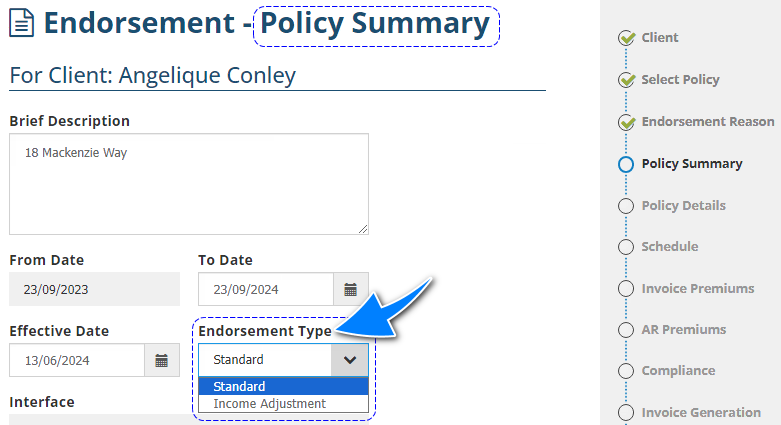
How to select the Endorsement Type
Introduction
There are two types of endorsements and INSIGHT uses them in the following manners:
 | Standard - (default Endorsement Type) used to update the policy/risk information, make invoice premiums corrections (not including income) and change the Interface from SCTP/Sunrise to Manual. |
 | Income Adjustment - depending on the Interface, used to make income corrections (broker fee and/or commission) entered for a transaction. |
How to select the Endorsement Type
Once you've selected Endorse, go to the Policy Summary page, locate the Endorsement Type field and choose the type you wish to use. By default, Standard is selected for this field.
For SCTP and Sunrise transactions, once Income Adjustment is chosen, the Interface will change to SCTP (manual) or Sunrise (manual) as it bypasses the interface and only applies to INSIGHT.
Income Adjustment
 | A common use for an Income Adjustment is when the Insurer is given the incorrect commission. The difference is processed through the endorsement and picked up in the insurer payment run. |
 | Another use is for adding a Broker Fee to an SCTP or Sunrise transaction if it was initially left out. |
 | Changes to broker fee, broker GST, commission and commission GST can be done using an Income Adjustment, depending on the transaction's Interface: |
| Interface | Broker Fee | Broker Fee GST | Commission | Commission GST |
| Manual |  |  |  |  |
| SCTP |  |  |  |  |
| Sunrise |  |  |  |  |
NOTE: For SCTP and Sunrise transactions, the Commission and Commission GST are not editable in INSIGHT because they are calcualted and downloaded from the respective platform itself.
Was this article helpful?
That’s Great!
Thank you for your feedback
Sorry! We couldn't be helpful
Thank you for your feedback
Feedback sent
We appreciate your effort and will try to fix the article