Click to go to:
Introduction
This article only applies to Manual policies. The policy numbers for SCTP & Sunrise policies are auto-downloaded into INSIGHT from the respective platform.
For Manual policies, the policy number must be manually entered otherwise the default display will be “TBA”. Scenarios where you may need to change the policy number are as follows:
 | You may not have had the policy number at the time of creating the policy |
 | The policy number was forgotten and not entered at the time of posting the invoice |
 | The policy number was entered incorrectly |
Once the policy number is updated on one transaction, this will also apply to all transactions under that policy.
Process
 | Locate the policy transaction you wish to update, select View to go into the Policy Transaction level, select Menu and Change Policy Number. | 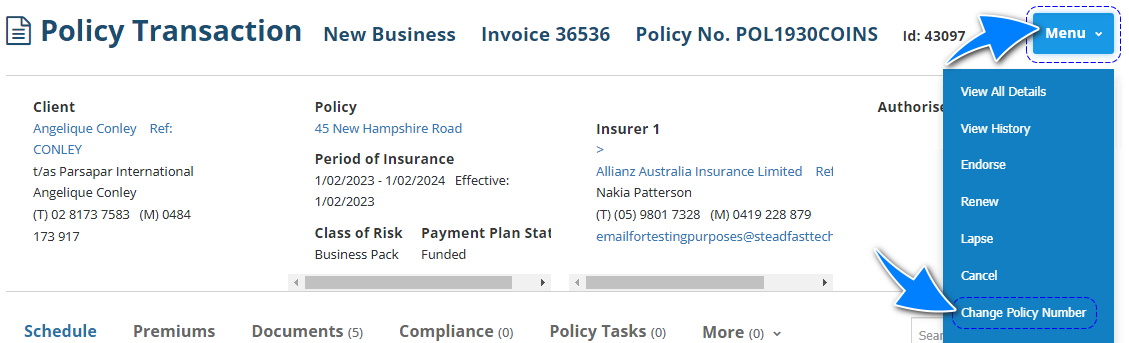 |
 | Enter the policy number and select Save. | 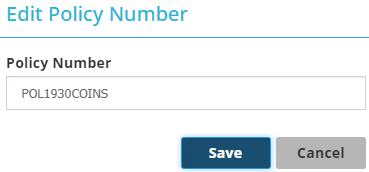 |
 | Remain at the Policy Transaction level, select Menu and View All Details. |  |
 | Using the navigation on the right side, select Invoice Generation. Once on the page, select the checkbox for Invoice, your desired Output Method (Download or Email), then select Create Documents. | 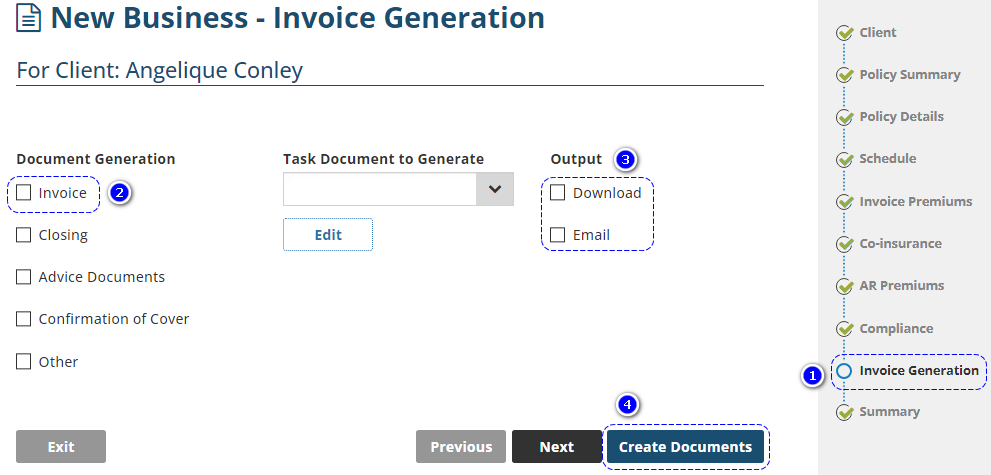 |
Was this article helpful?
That’s Great!
Thank you for your feedback
Sorry! We couldn't be helpful
Thank you for your feedback
Feedback sent
We appreciate your effort and will try to fix the article