Introduction
Transaction wizards are tailored to serve the purpose of each transaction type, however, they do share generic & common pages regardless of the transaction type. These common pages are:
 | Policy Summary |  | AR Premiums |
 | Policy Details |  | Compliance |
 | Schedule |  | Document or Invoice Generation |
 | Invoice Premiums |  | Summary |
Policy Summary
For Quotation and New Business transactions, the fields on this page will be blank. However, the following transactions (ie: Endorsement, Renewal, etc.) will carry over this information and have it pre-filled in the fields.
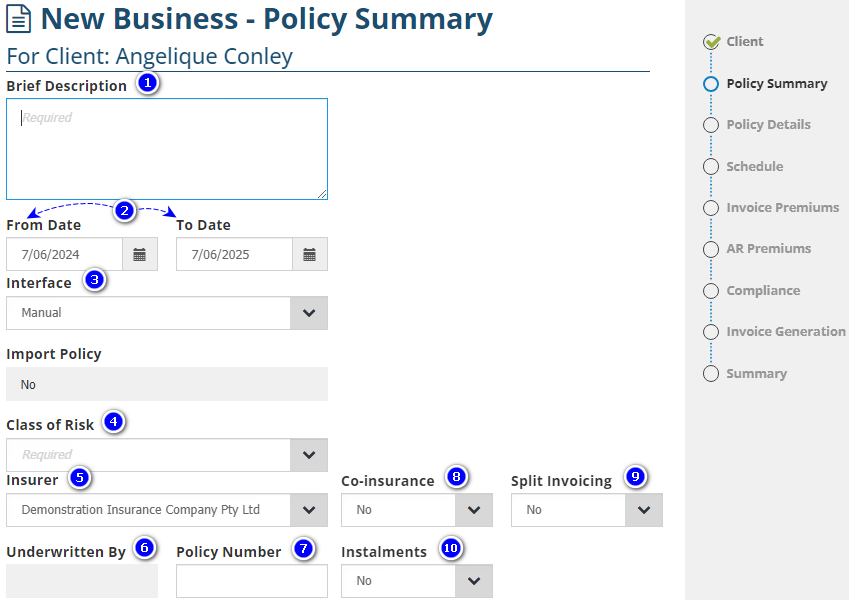
1. Brief Description - This is a mandatory field; also known as the Policy Description in other parts of INSIGHT. Information entered here can be used to search for the policy. To make searching easier, you may enter risk-specific data such as the vehicle registration number or the situation address.
2. From & To Date - This refers to the period of insurance the transaction relates to. By default, the From Date will be the present date & the To Date is 12 months from this date, however, both can be edited.
NOTE: The From Date must be within 2 months from the present date. INSIGHT will display a warning message to prompt you when this requirement is not met, however you can still proceed with the transaction.
3. Interface - Determines whether the transaction is processed manually or through the electronic interface SCTP or Sunrise. Your selection here will adjust the wizard and launch the interfaces accordingly.
4. Class of Risk - By default, this will display all classes of risk linked to your chosen Interface. The class of risks' commission rates and credit terms are set up behind the scenes by your Administrator.
5. Insurer - By default, this will display all insurers linked to your chosen class of risk. Alternatively, you can first select the Insurer, and then the Class of Risk will default to displaying the classes of risk linked to your chosen Insurer.
6. Underwritten By - Becomes available when the Insurer selected is marked as an Underwriting Agency or Wholesale Broker. Use this field to select the 'supporting insurer' (provides security for the policy).
7. Policy Number - Used to capture the policy number received from the insurer for manually processed policies. SCTP & Sunrise policies will automatically have this filled when the transaction is finalised.
8. Co-insurance - Activates the Co-insurance feature, which is only available for manual policies and is not available for instalment policies. This feature is used when there is more than 1 insurer on the policy (ie: layered liability).
9. Split Invoicing - Activates the Split invoicing feature, which is only available for manual policies and is not available for instalment policies. This feature is used when the invoice is paid by more than 1 entity.
10. Instalments - Activates the Instalment feature for manual policies. For SCTP & Sunrise policies, this feature is activated through the respective platforms themselves. Instalments refer to policies that are paid monthly & directly to the insurer.
NOTE: Please consult your business rules & processes before using fields 6-10, as some features may not be applicable for your site.
Was this article helpful?
That’s Great!
Thank you for your feedback
Sorry! We couldn't be helpful
Thank you for your feedback
Feedback sent
We appreciate your effort and will try to fix the article