Introduction
This report provides a statement of how much a Producing Broker owes you. Each statement will be addressed to one Producing Broker and lists the client policies with what is Net Due for each. There are 3 sections you can use to create the report:
- Parameters
- Date Selection
- Filters
Once you've made your selections, choose the exports as option and select Run Report.
Parameters
There are 2 fields in this section:
 | Print the following text on the Statement - text entered in this field will display at the bottom of the statement.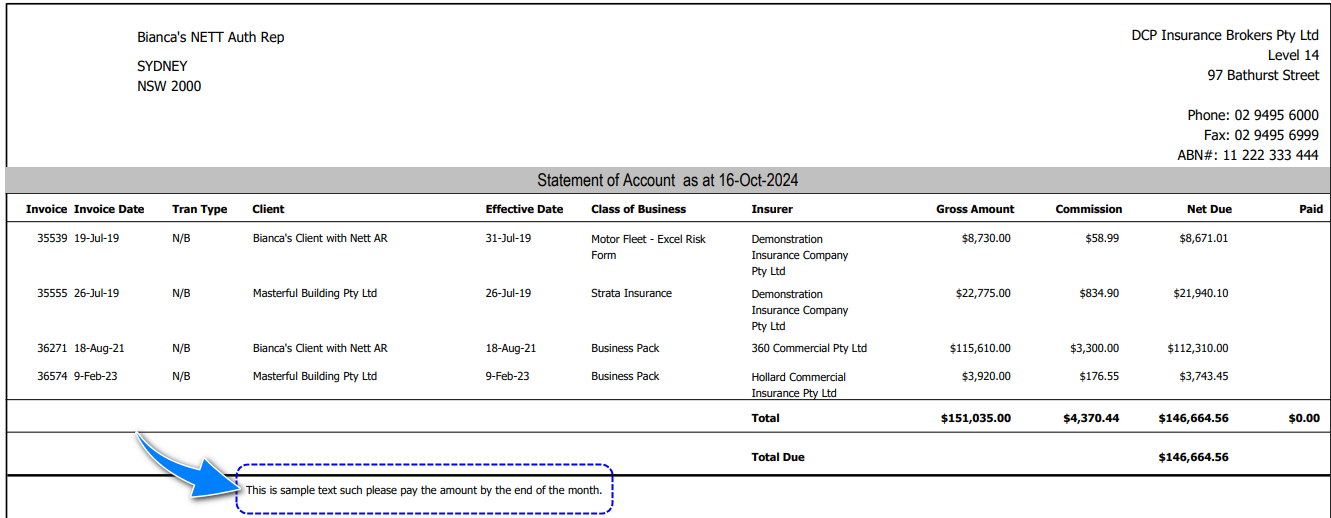 |
 | Include paid items - options are Yes or No. When Yes is selected, the statement will also include policies that have received payment. |
Date Selection
This allows you to create the report based on policies as of the chosen As At Date.
Filters
There are 2 fields in this section:
 | Client - defaults to All, however, you can clear the field and type in a specific client's name. |
 | Producing Broker - defaults to All, however, you can use the dropdown selection to choose from the available Producing Brokers. |
Was this article helpful?
That’s Great!
Thank you for your feedback
Sorry! We couldn't be helpful
Thank you for your feedback
Feedback sent
We appreciate your effort and will try to fix the article