Click to go to:
Introduction
INSIGHT reports are grouped into different headings. The Revenue & Earnings heading captures the following reports:
| Broker Earnings Detail Broker Earnings Summary Portfolio Analysis | Register of Business Written Broker Fee Analysis |
Broker Earnings Detail
 | This report provides a list of transactions detailing fees and commissions earned based on your selected report type and date range. |
 | You can further drill down to specific categories such as Client, Branch, Sales Team, Payment Plan etc. using the available filters. |
 | To better organise the information, you can also group the invoices by Client, Auth Rep & Prod Broker, Branch, Class of Business, Insurer, Payment Plan, Sales Team, Services Team and Transaction Number. |
The Report Type options are:
 | Invoiced |

 | Gross Earned |

 | Net Earned |

Broker Earnings Summary
This report provides a list of transactions detailing fees and commissions earned based on your selected style and date range. Unlike the Broker Earnings Detail, there is no option to further drill down to specific categories aside from Payment Plan.
The Style options are:
 | Summary |

 | Detail |

Portfolio Analysis
IMPORTANT: This report pulls current /active policies based on their expiry date. For example, to view the portfolio for the year 1 July 2023 - 30 June 2024, select the From Date and To Date as 1 July 2024 - 30 June 2025.
| The report display is based on your Sort By selection - for example, when you choose Insurer, the report will display the total amount of policies written and the earnings breakdown for each Insurer. | 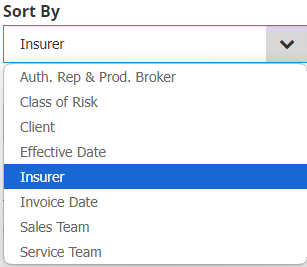 |

You can further drill down to specific categories by setting Select All Records as No. The other fields specific to this report are:
 | Net Income
|
 | Income Order
|
Register of Business Written
This report lists invoices written and their income breakdown based on your specified date range. You can view invoices based on the Date Options: Effective Date or Date Posted.

| Use the available parameters, filters and grouping & sorting to customise the report according to how you want to review information. | 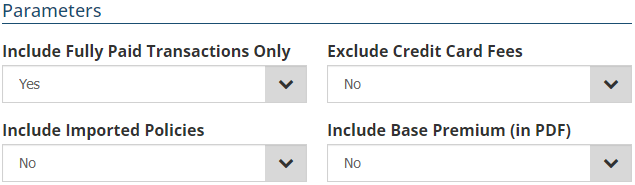 |
Broker Fee Analysis
 | This report is available when the Multiple Broker Fee feature is enabled in INSIGHT. |
 | Provides a breakdown of fees charged per transaction. |
The Report Type options are:
 | Earned - provides the Date Option = Client Paid Date |

 | Invoiced - provides the additional field, Include Fully Paid Transactions Only = Yes or No and the Date Option = Date Posted or Effective Date |

Use the available parameters, filters and grouping & sorting to customise the report according to how you want to review information.
Was this article helpful?
That’s Great!
Thank you for your feedback
Sorry! We couldn't be helpful
Thank you for your feedback
Feedback sent
We appreciate your effort and will try to fix the article