
Monitoring can only be accessed by Administrators and System Administrators. This tool is generally used for troubleshooting and is made up of two sections: Background Jobs and User Logins.
Background Jobs
The majority of jobs listed in Monitoring occur as part of routine maintenance, for example, AuditStorageBlobBackup.
However, jobs can also be initiated by a user. In these cases, Monitoring will record whether the job was a success or not - this is generally useful for identifying timeouts. Another example is when users generate reports. If the report generation is successful, users can also re-download the file from Monitoring instead of re-generating the report - this is useful for large reports that take time to generate.
Information displayed in Background jobs is used to identify:
 | Date and time a job happened |  | Whether it was successful or not |
 | What the job was |  | Select View to see more details |
 | Who started the job |
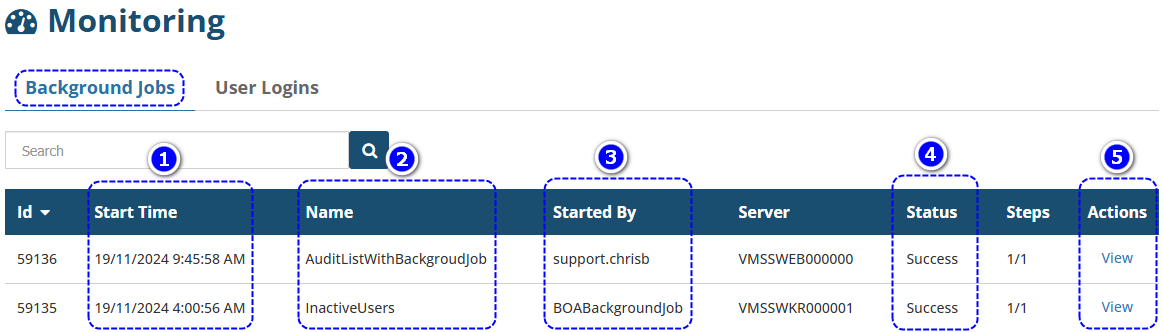
 QUICK TIP: To re-download a report, locate the report job and beside it, select View. In the new page, locate and select Download File in the bottom left corner.
User Logins
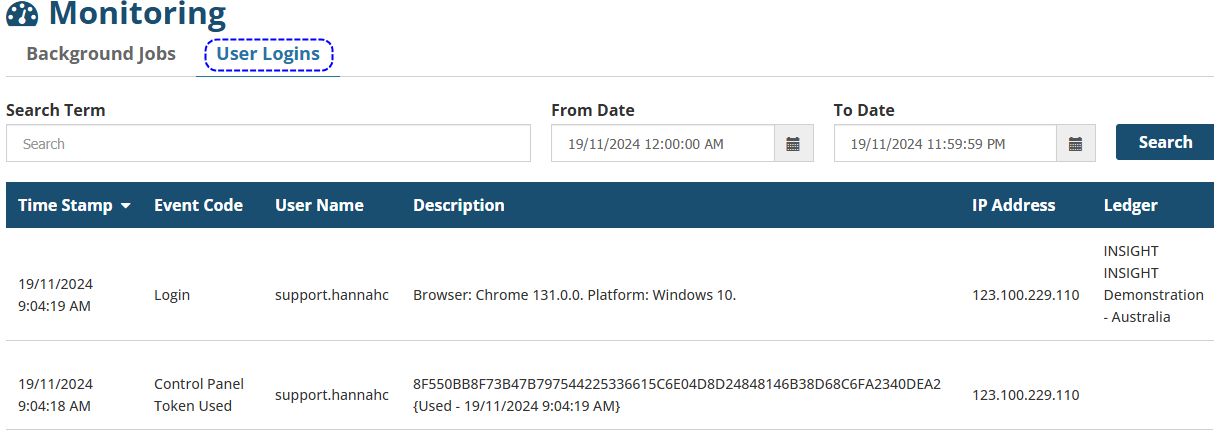 This section is used to monitor events related to logging in and out. Below is a summary of general events recorded here:
 | Log in - identifies the time, browser and IP address a user uses to access a ledger |
 | Log out - identifies when a user logs out for a ledger |
 | Failed Log in - provides the reason why a user cannot log into a ledger |
 | Control Panel token used - records when a user accesses the ledger through the control panel vs a direct login to the ledger (this is generally used by System Administrators). |
 | Change password - records whether a change of password was successful or not |
 | Reset Token - records when a password reset token was requested, as well as displays the token ID itself. |
 | MFA Token Used - displays the MFA Token sent to the user |
 | MFA Remember Browser Cookie - displays whether the 'Remember browser' option was chosen |
Was this article helpful?
That’s Great!
Thank you for your feedback
Sorry! We couldn't be helpful
Thank you for your feedback
Feedback sent
We appreciate your effort and will try to fix the article