Supporting Insurer
When writing policies through an Underwriting Agency or Wholesale Broker, it is required to disclose the securing underwriter or the supporting insurer.
To cater for this, INSIGHT has the following Insurer profile Insurer Types:
- UW Agency or Wholesale Broker - used to record the Underwriting Agency where they are remitted Net premiums and underwriter fees.
- Underwriter - used to record the securing entity or the supporting insurer in conjunction with an Underwritng Agency.
Separate Insurer profiles need to created for an Insurer and an Underwriter. You cannot have one Insurer profile for both types.
Click here to skip to the following content:
Create the Underwriting Agency profile
Create the Underwriter profile
| To view the following videos in a larger format, please expand the controls and select the Full Screen button. |
Setup & Configuration
Create the Underwriting Agency profile
Click the Details button to view step by step instructions.
| The same steps can be used to create a Wholesale Broker profile - for Step 3, choose Wholesale Broker instead. |
Create the Underwriter profile
Click the Details button to view step by step instructions.
1. Select Add, then Add Insurer.
2. Complete the Profile page, then proceed to the Classification page.
3. In the Insurer Type field, choose Underwriter.
4. Complete the rest of the wizard and select Save.
Because this record only exists to record the supporting insurer:
|
Transaction Processing
Once you have setup the Underwriting Agency/Wholesale Broker and the Underwriter, you are ready to start processing policies with a Supporting Insurer.
Click the Details button to view step by step instructions.
Documentation
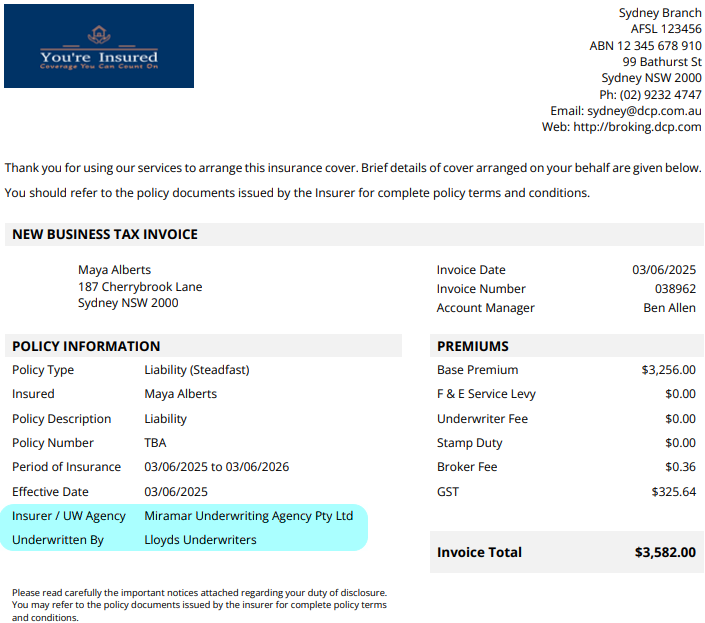
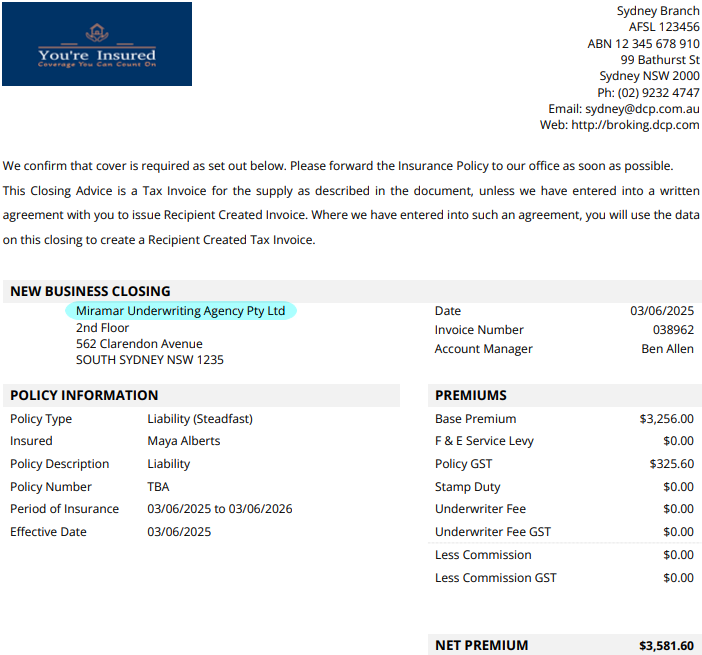
INSIGHT Document templates are configured to automatically include both the Underwriting Agency and the Supporting Insurer as per the examples below. Please contact INSIGHT Support if your current document templates need amending to include either the Underwriting Agency or the Supporting Insurer.
Click the Details button for sample documents.
Closing Sample
Something got you stumped?
Our team is here to help! We know change can be tricky, but we've got your back.

Contact our support team here and well get back to you shortly
Was this article helpful?
That’s Great!
Thank you for your feedback
Sorry! We couldn't be helpful
Thank you for your feedback
Feedback sent
We appreciate your effort and will try to fix the article