Click to go to:
Policies Due for Renewal - My Lists
Introduction
Your renewals are generally accessed in the Policies for Renewal list under My Lists. Depending on your site's business rules, you may also have access and/or receive a renewal report to manage upcoming renewals.
Policies Due for Renewal - My Lists
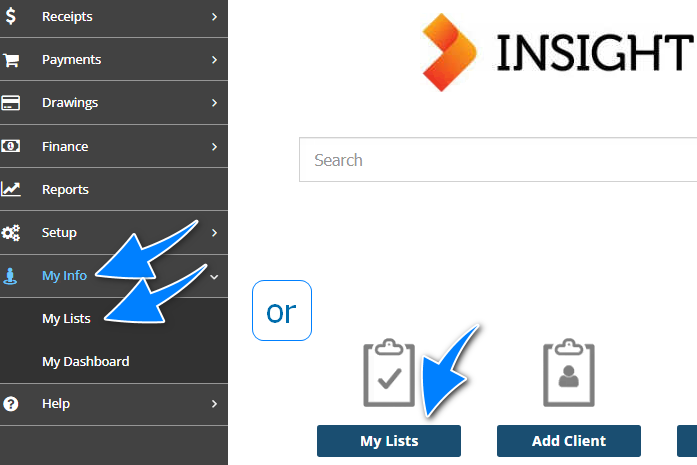
You will find a shortcut to My Lists on the home page. If not on the home page, select the My Info option from the side menu, then choose My Lists.
Out of the 6 available lists, select the tab for Policies Due for Renewals. You can adjust your list using the Ageing and Up To Date filters. From here, you can work through the list by opening each renewal in a different tab and returning to your list for the next renewal. Alternatively, once you have adjusted your list, you can export the list as an Excel or PDF file and continue to work through your renewals in that manner.
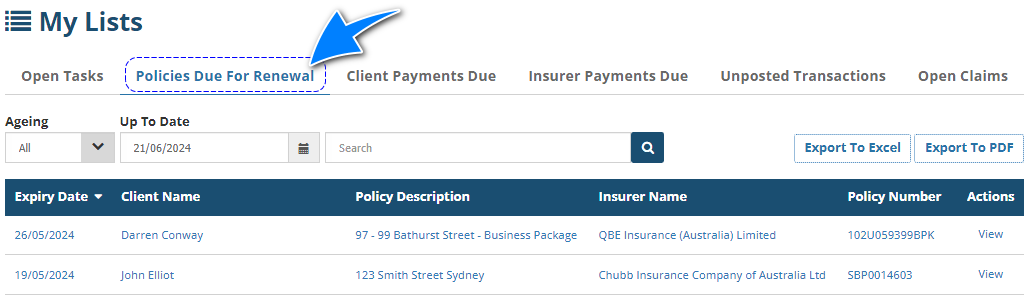
 NOTE: All items on the list are hyperlinked and will take you to the respective pages. Choosing items under the Expiry Date, Policy Description, Policy Number and Actions will take you to the policy. While choosing an item under the Client Name will take you to the client profile and an item under the Insurer Name will take you to the insurer profile.
Renewal Report
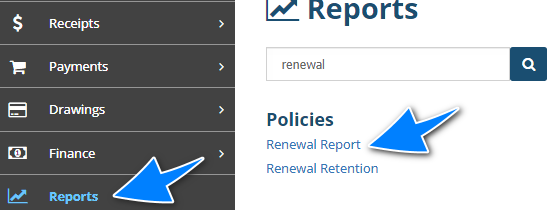
If you have access to the Renewal report, select Reports from the side menu and choose Renewal Report.
There are several filters you can use to customise the report. Refer to the Running Reports guide for further information on how to use the available filters.
Was this article helpful?
That’s Great!
Thank you for your feedback
Sorry! We couldn't be helpful
Thank you for your feedback
Feedback sent
We appreciate your effort and will try to fix the article