Click to go to:
Introduction
When you go to the top right corner and select your name, you'll find the options for Switch Ledger and My Profile.
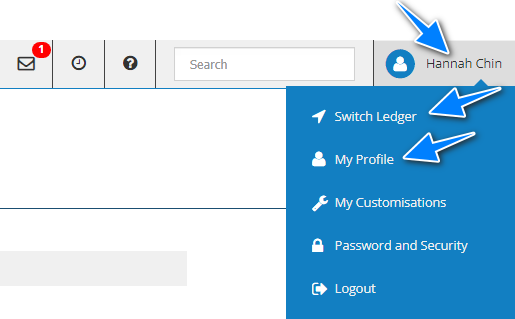
Switch Ledger
Depending on your business set-up, you may have access to multiple ledgers (ie: if you work with multiple currencies).
Instead of signing out and into the different ledgers, you can easily change between them using the Switch Ledger feature.
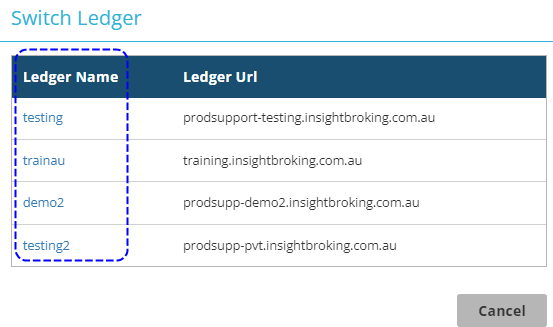
- When you select Switch Ledger, a window will open with the ledgers you have access to.
- Simply select the ledger name of the ledger you wish to go to and this will open in a separate tab.
 QUICK TIP:
You can keep the different ledgers open in different tabs and click through them as needed.
 QUICK TIP:
You can keep the different ledgers open in different tabs and click through them as needed.
My Profile
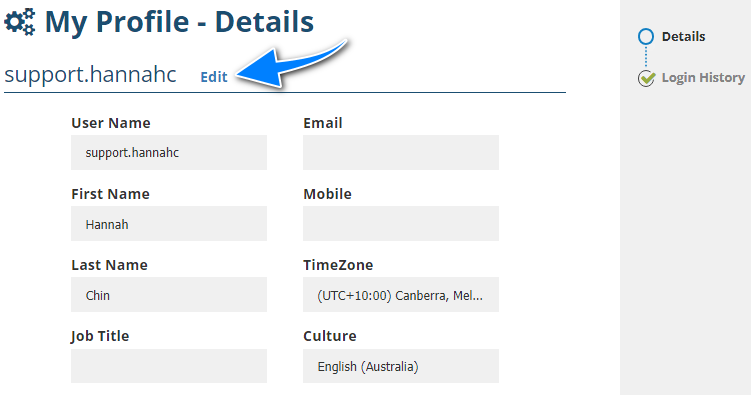
My Profile contains basic account information such as the following:
|
|
|
|
|
|
|
|
|
 IMPORTANT: Items marked with an asterisk (*) indicate that the item is not editable due to security reasons.
 Selecting Edit allows you to update the remaining items as needed.
Was this article helpful?
That’s Great!
Thank you for your feedback
Sorry! We couldn't be helpful
Thank you for your feedback
Feedback sent
We appreciate your effort and will try to fix the article