Click to go to:
Introduction
INSIGHT reports are grouped into different headings. The Compliance heading captures the following reports:
| ABN Missing | Compliance Report |
| APRA Form 701 Report | Steadfast Report |
ABN Missing
| This produces a list of all entities with an ABN, however, you can filter it to specific entities using the Entity Type selection made available when you select No to Select All Records. | 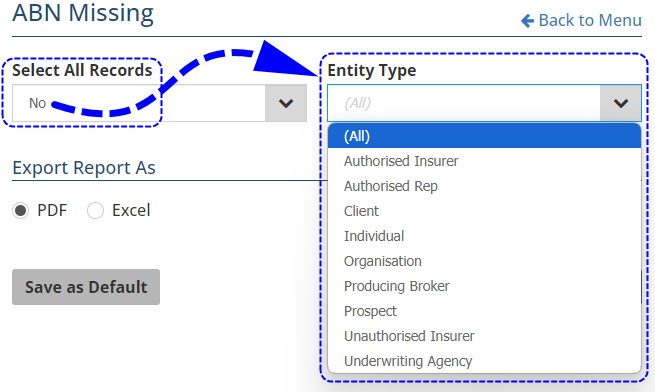 |
APRA Form 701 Report
This produces Form 701 which collects information on contracts of insurance invoiced during the selected reporting period and is sent to APRA as part of regulatory reporting.
Compliance Report
This report has 2 Report Types:
 | Client Compliance - this produces a report that monitors when an FSG was sent to the client. It lists clients with the following details: |
|
|
 | Policy Compliance - this produces a report that monitors when an FSG, PDS and TMD were sent to the client. It lists policies with the following details: |
|
|
Steadfast Report
This is a report automatically sent periodically to Steadfast. It lists the total policies per insurer and class of risk while breaking down the premiums by base premium, FSL, Stamp Duty, Broker Fes and Commission for the selected period. You can also manually produce this report and report on policies by Effective Date or Invoice Date.
Was this article helpful?
That’s Great!
Thank you for your feedback
Sorry! We couldn't be helpful
Thank you for your feedback
Feedback sent
We appreciate your effort and will try to fix the article