| Version 1.02 | 17 January 2021 |  |
Table of Contents |
How do I convert an SCTP policy to Manual? |
1. Search for the policy and select Endorse or Renew (if applicable).
2. Navigate to the Policy Summary page and change the Interface to Manual.
3. Complete the wizard and post the transaction to accounts on the Invoice Generation
page - the policy is now converted to a Manual policy.
NOTE: You must notify the insurer that you have converted the policy to Manual so they can do the same on their end.
How do I obtain a Certificate of Currency in SCTP? |
Refer to the SCTP Documents article.
How do I see multiple quote schedules for an SCTP quotation? |
INSIGHT only displays the schedule of the selected SCTP quote. To compare and obtain different quote schedules, you need to launch SCTP and download the documents.
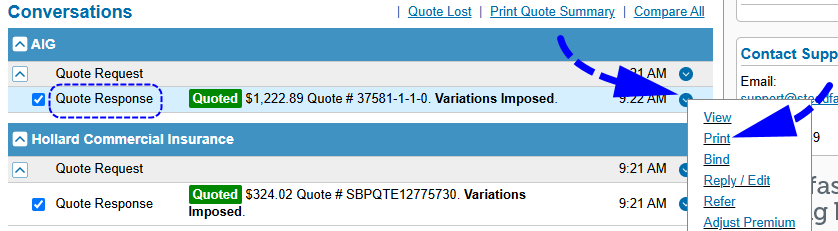
Option 1 1. Search for the quote. 2. Select View. 3. From Menu at the top right-hand corner, select View All Details. 4. From the Quote wizard, select SCTP. 5. Select Launch SCTP. 6. From the Option menu for each quote response, select Print.
| Option 2 1. Search for the quote. 2. Select View. 3. From Menu at the top right-hand corner, select View All Details. 4. From the Quote wizard, select SCTP. 5. Select Launch SCTP. 6. Select Compare All or select the ones you’re interested in and click Compare Selected. 7. In the Quote Response Comparison screen, select Print from the Actions panel. 8. Select Done to return to INSIGHT. |
Do I need to launch SCTP to see an insurer's response to the referral? |
You do not need to launch SCTP to see if an insurer has responded to a referral.
1. Search for the transaction in INSIGHT (Quote, Endorsement or Cancellation)
2. Select View.
3. From Menu at the top right-hand corner, select View All Details.
4. From the transaction wizard, select SCTP.
5. Select Refresh on INSIGHT’s SCTP page.
NOTE: Check for changes in the quote status.
When I open SCTP Documents I get error 500 in Internet Explorer? |
This may be due to Internet Explorer blocking Steadfasthub. As a fix, add Steadfasthub as a safe site in Internet Explorer:
1. From the Internet Explorer Tools menu, select Internet Options.
2. Select the Security tab, and select Trusted Sites.
3. Select Sites.
4. Enter “https://*.steadfasthub.com” in the Add this website to the zone field and
select Add.
5. Ensure there is no tick in the checkbox for Require server verification (https:) for
all sites in this zone.
6. Select Close.
On renewal, how do I remarket a policy on SCTP? |
To place a Sunrise or Manual policy on SCTP:
1. Search for the policy.
2. Select More and then Renew.
3. In Policy Summary, change Interface to SCTP.
4. Enter a Class of Risk and Insurer, then select Next.
5. In SCTP, create the quote and bind it.
6. Select Done to leave SCTP.
7. Complete the wizard and select Post to Accounts.
I can access INSIGHT, but cannot launch SCTP? |
As INSIGHT is integrated with SCTP, the login must be the same in both, in order for the two systems
to communicate with each other.
To add an INSIGHT user to SCTP, please send an email to support@steadfasttech.com.au
How do I add a broker fee to a completed SCTP policy? |
To add a broker fee after you have a finalised transaction and posted to accounts:
1. Search for the policy in INSIGHT.
2. Select Endorse in the Actions column.
3. On the Policy Summary page, select Income Adjustment in the Endorsement Type field.
4. Select Next.
5. Complete the transaction as normal.
How to change the effective date of an endorsement in SCTP? |
INSIGHT is integrated with SCTP, therefore the dates need to be modified in INSIGHT. The dates will will update in SCTP when you launch it from the wizard.
1. Locate the policy.
2. Select Endorse in the Actions column.
3. On the Policy Summary page, change the Effective Date.
4. Select Next to launch SCTP.
5. Select Send.
6. Process the endorsement until it is bound, then select Done to return to INSIGHT.
7. Complete the wizard and select Post to Accounts.
Insurer has converted the policy to Manual. How do I get the renewal in SCTP? |
Once a policy is converted to Manual, you can no longer access the policy in SCTP (even on
renewal). If you want to place the policy in SCTP, we recommend that on renewal you create a New Business quote in SCTP.
What’s New? Version 1.02
Version 1.01
Version 1.00.00
|
Was this article helpful?
That’s Great!
Thank you for your feedback
Sorry! We couldn't be helpful
Thank you for your feedback
Feedback sent
We appreciate your effort and will try to fix the article