| Version 1.02 | 6 January 2020 |  |
Table of Contents |
What does closed and unclosed status mean? |
Closed - the policy is finalised and bound with the insurer.
Unclosed - the policy is not bound or finalised with the insurer.
How do I convert a policy to manual? | Return to top |
The steps to convert a Sunrise policy to a Manual interface will differ depending on the status of the policy, as described below:
Closed Sunrise Policy
1. Search for the policy and select Endorse or Renew (if applicable).
2. Navigate to the Policy Summary page and change the Interface to Manual:
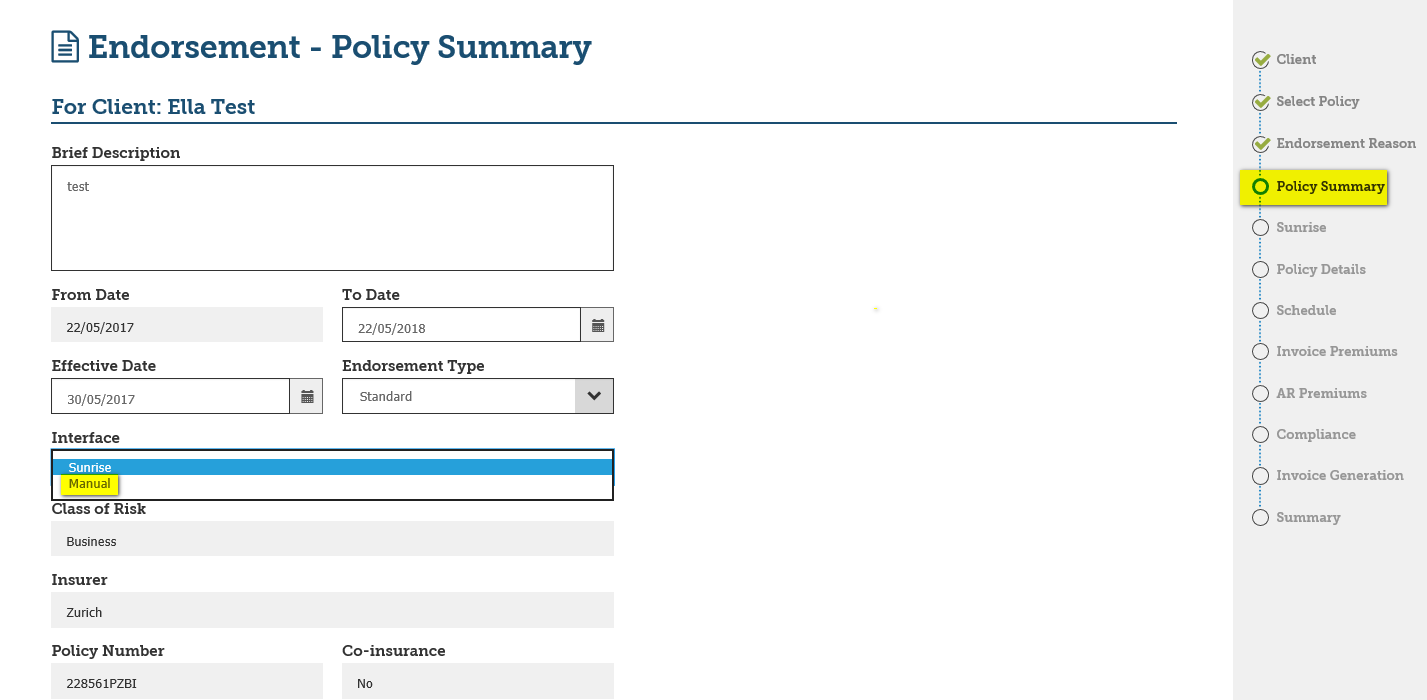
3. Complete the wizard, ensuring $0 premiums are included in the transaction, and post the transaction to accounts - the policy is now converted to a Manual policy.
 NOTE: You must notify the insurer that you have converted the policy to Manual so they can do the same on their end.
Unclosed Sunrise Policy
1. Search for the policy and select Cover Note Amendment from the More menu:
2. Navigate to the Policy Summary page and change the Interface to Manual - complete the wizard with $0 premiums to finish converting the policy to Manual.

How do I recover a transaction? |
You must first contact EBIX to obtain the recovery number. Once you have the recovery number, complete the following steps (NOTE that only INSIGHT Administrators can complete these steps):
1. Search for the Invoice Number.
2. Select Endorse and navigate to the Sunrise page in the policy wizard
3. Select Recover transaction from the Utilities menu at the base of the screen.
4. Enter the recovery number provided by EBIX into the Reference Number field.
5. Select INSNET from the Sunrise Server dropdown menu. Select Policy and select OK.
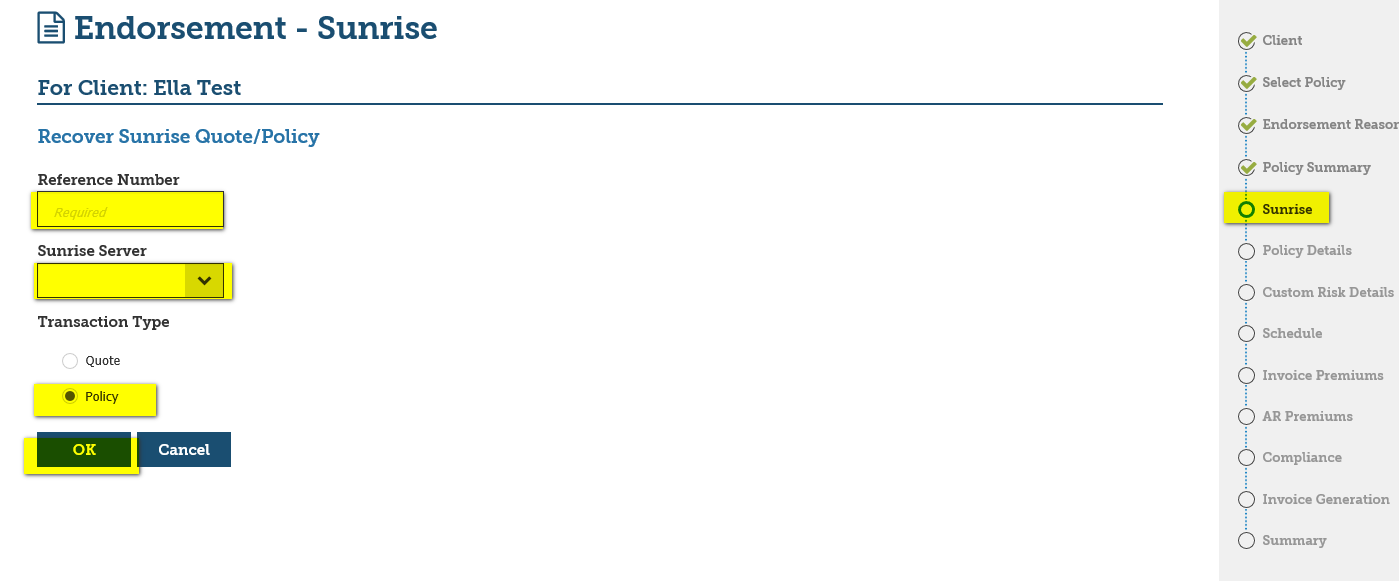
6. Complete the wizard, then select Save and go to summary to complete the transaction.
How do I lapse a transaction in Sunrise? | Return to top |
If you have posted a Sunrise unclosed policy, we recommend that you close the policy, then cancel it from inception. If you lapse a policy that has been posted, the premiums will not be reversed.
 NOTE: You cannot lapse a closed Sunrise policy, as once you close a transaction the insurer only allows you to cancel the policy.
How do I close a Sunrise policy? | Return to top |
1. Search for the policy.
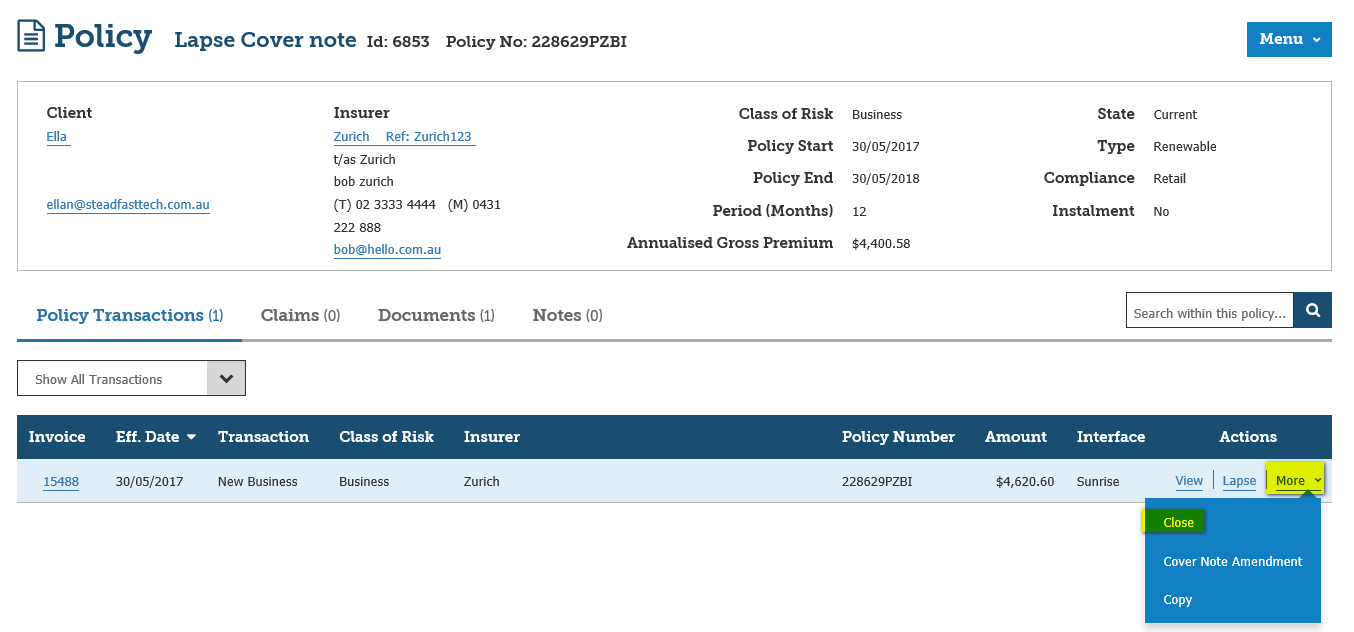
2. Select Close from the More menu:
How do I delete a Sunrise transaction? | Return to top |
 IMPORTANT: Accepted transactions cannot be deleted from Sunrise or reversed. To delete an accepted transaction, you must create a new transaction that reverses the previous transaction (e.g. if you created an endorsement to add a vehicle, then do another endorsement from the same date to remove the vehicle).
To delete an Un-Accepted & Unposted Transaction:
1. Search for the policy.
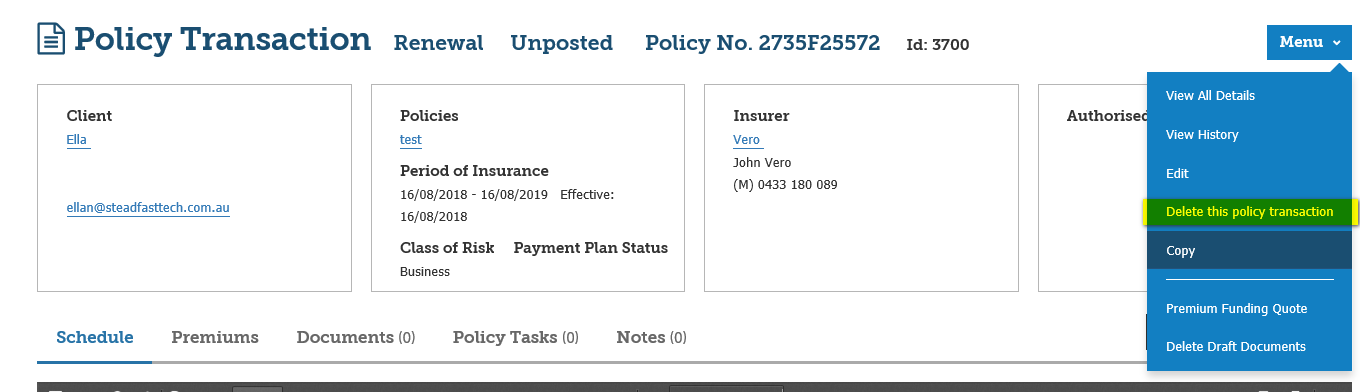
2. Select View from the Actions column for the unposted transaction:

3. Select Menu.
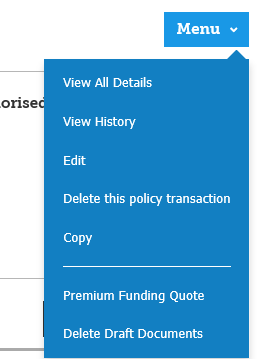
4. Select Delete this policy transaction.
How do I print insurer documents? |
QBE
1. Locate the policy.
2. Select View.
3. Select View all details.
4. Select the Sunrise page.
5. Select Sunrise Actions, View and generate the document from QBE’s Portal.
All other insurers
Refer to the article Sunrise Documents.
I can't see all the buttons in a Sunrise insurer's portal or open the schedules. |
For the Sunrise insurer’s portal to function correctly using Internet Explorer browser, the settings in Internet Explorer will need to be modified as explained below:
1. Launch the insurer’s portal from an existing policy transaction wizard or create a new quote.
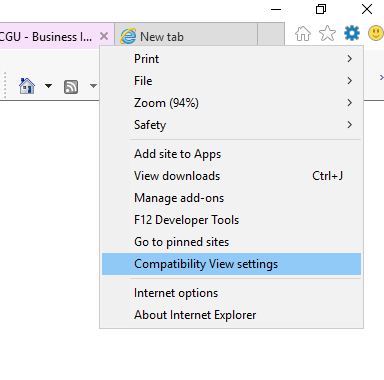
2. Select Tools in Internet Explorer and choose Compatibility View settings -The insurer’s website will be listed.
3. Select Add in the Compatibility View Settings dialog box - this will add the insurer’s portal in compatibility mode so it can function correctly.
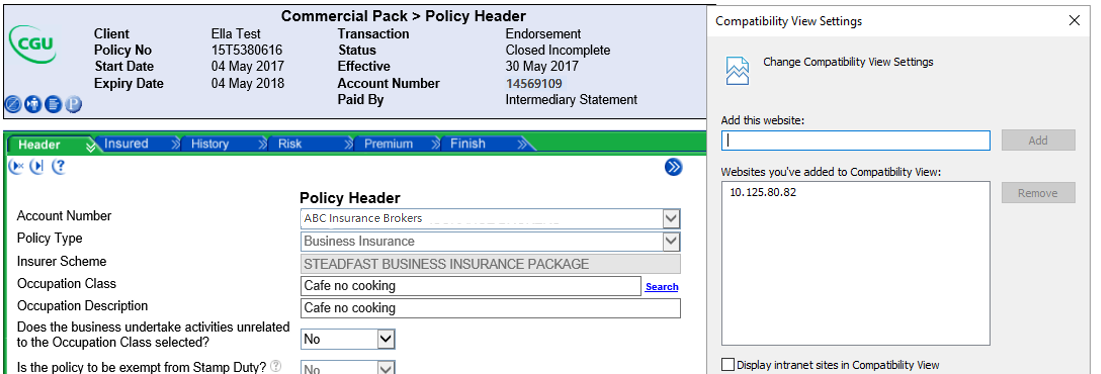
4. Select Close.
What to do when you cannot open insurer documents? | Return to top |
Pop-up blockers in your browser may be preventing documents from opening in Internet Explorer (IE). You can change your IE settings to ensure that Sunrise documents are not blocked. The steps are:
| 1. Select Internet Options from the Tools menu. 2. Select the Privacy tab. 3. In the Pop-up Blocker panel, click Settings. 4. Add the insurer’s IP address 5. Click Close. | 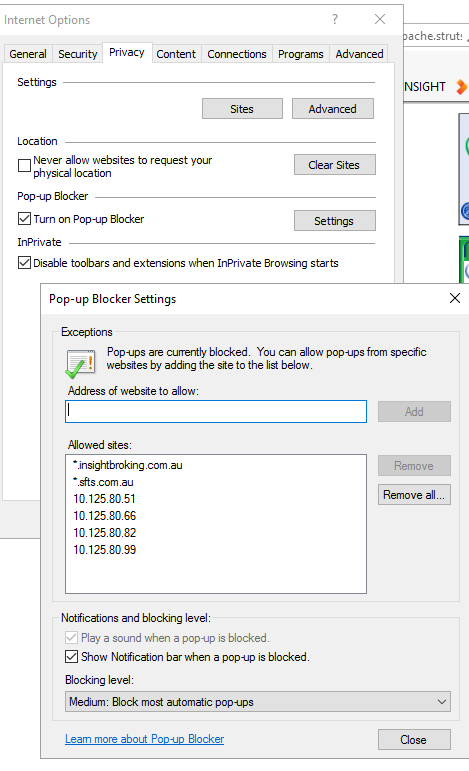 |
How do I cancel a policy with a renewal in place? |
Scenario 1
The insurer has produced a renewal on their portal. However, the renewal has not been called on in INSIGHT (i.e. no renewal transaction exists in INSIGHT):
1. Contact the insurer and ask them to back out the renewal.
2. Process the cancellation in INSIGHT as normal via Sunrise.
 NOTE: If you don’t do the above and attempt to cancel the policy, you will see an error similar to “Unsupported Action Cancel” in the insurer’s portal.
Scenario 2
The renewal is produced in INSIGHT. However, it is in unposted status:
1. Delete the transaction from INSIGHT.
2. Start the cancellation and proceed as normal.
Scenario 3
Renewal is accepted on Sunrise:
1. Cancel the renewal from inception.
2. Create an endorsement and switch the interface to Manual.
3. Cancel the new business manually.
How do I submit a referral for review? |
1. Complete the transaction in the Sunrise insurer’s portal and navigate back to INSIGHT.
2. Select Submit for Referral from the Sunrise Actions menu.
3. Enter your name and email address and select OK.
 NOTE: This is important to ensure you receive the underwriter’s confirmation via email.
4. Once you have received the confirmation from the underwriter, return to the policy transaction wizard and complete the following steps:
4.1 Search for the policy.
4.2 Select Edit.
4.3 From the policy wizard, click Sunrise.
4.4 In the Sunrise Actions menu, click Update Rating Status.
4.5 Complete the policy wizard.
4.6 Post to accounts.
The schedule is not downloaded to INSIGHT for Sunrise policies. I'm getting an XML Parse error. How can I fix it? | Return to top |
XML Parse error means that the schedule contains a special character (such as one of the following: !@#$%^&*()_+) in the schedule. You will need to contact the insurer’s support team and ask them to amend the schedule to remove all special characters. Once the insurer has confirmed that all special characters have been removed, regenerate the schedule in INSIGHT.
How do I import a renewal? | Return to top |
1. Search for the policy in INSIGHT.
2. Select Renew from the policy’s Actions menu.
3. On the Policy Summary page, select Yes in the Import Policy field.
4. Select Next.
5. Select the policy in the Import Selection page then select Next.
6. Complete the transaction as normal.
How do I add a broker fee without breaking the connection to Sunrise? |
1. Search for the policy in INSIGHT.
2. Select Endorse from Actions.
3. On the Policy Summary page, select Income Adjustment in the Endorsement Type field.
4. Select Next.
5. Complete the transaction as normal.
What's New?Version 1.02
Version 1.00.01
Version 1.00.00
|
Was this article helpful?
That’s Great!
Thank you for your feedback
Sorry! We couldn't be helpful
Thank you for your feedback
Feedback sent
We appreciate your effort and will try to fix the article