Introduction
Transaction wizards are tailored to serve the purpose of each transaction type, however, they do share generic & common pages regardless of the transaction type. These common pages are:
 | Policy Summary |  | AR Premiums |
 | Policy Details |  | Compliance |
 | Schedule |  | Document or Invoice Generation |
 | Invoice Premiums |  | Summary |
AR Premiums
When an Authorised Representative (AR) or Producing Broker (PB) is linked to a client, their details (including their Income Total) will automatically be displayed on this page.
 NOTE: Clients and transactions can only have ONE Producing Broker linked to them, however you can link multiple ARs; a Producing Broker can ONLY be linked at the creation of a client, then it will automatically be linked to all client transactions.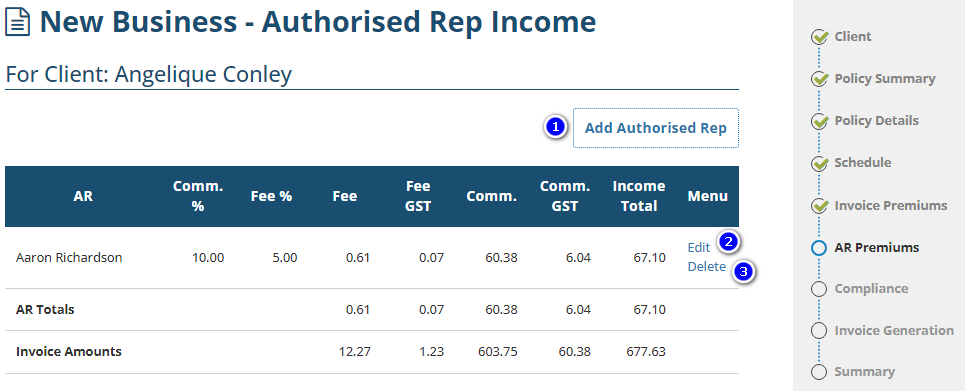
1. Add Authorised Rep - Used to add up to 5 ARs in total ONLY to the transaction, not the client.
2. Edit - Allows you to edit the AR's or PB's income totals; you can either enter a percentage or an exact dollar figure for the commission or broker fee.
NOTE: Default Commission & Broker Fee percentages will be set up by your Administrator. A warning message displays when you modify these values and provides you with the option to return to the default values. If you have verified the values and wish to proceed, select Next.3. Delete - Allows you to delete an AR from the transaction ONLY; this does not remove the AR from the client. This option is not available for clients with a Producing Broker as you CANNOT remove a PB from the transaction or client.
Was this article helpful?
That’s Great!
Thank you for your feedback
Sorry! We couldn't be helpful
Thank you for your feedback
Feedback sent
We appreciate your effort and will try to fix the article