Introduction
Transaction wizards are tailored to serve the purpose of each transaction type, however, they do share generic & common pages regardless of the transaction type. These common pages are:
 | Policy Summary |  | AR Premiums |
 | Policy Details |  | Compliance |
 | Schedule |  | Document or Invoice Generation |
 | Invoice Premiums |  | Summary |
Policy Details
IMPORTANT: As document setups vary per site, please confirm if your invoice or closing documents extract information from any of these fields. Consult your business rules & practises for the best way to utilise the following fields.
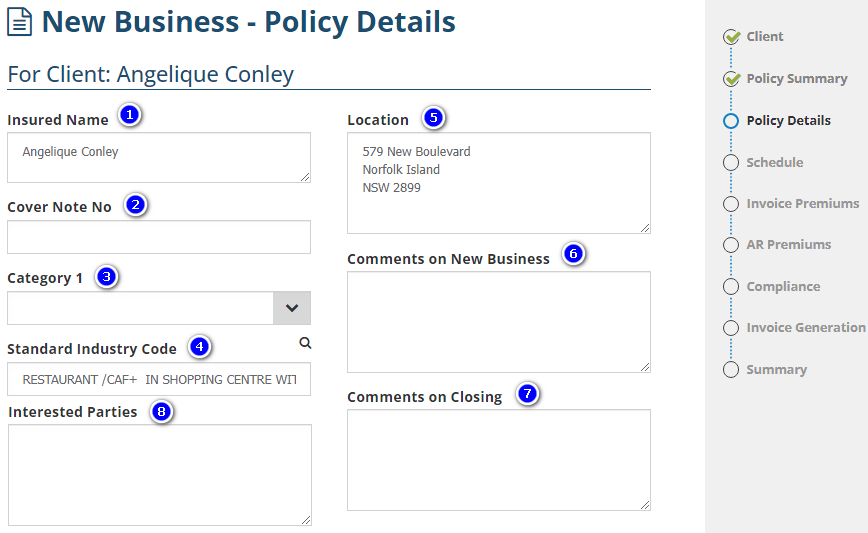
1. Insured Name - By default, the name belonging to the Client in use will auto-fill here, however, this field is editable (it is up to you to change this field to display the correct insured name).
2. Cover Note No - Generally used for manual policies & is used to record the cover note number, if applicable.
3. Category - INSIGHT offers the option of up to 3 custom Category labels for policy transactions. Your administrators may generally set up these fields to further classify policy transactions for reporting or to generate information onto document templates.
4. Standard Industry Code - Displays when activated in Ledger settings by your Administrator. Enter a keyword/s, then INSIGHT will generate relevant Standard Industry Code matches.
5. Location - By default, the address belonging to the Client in use will auto-fill here, however, this field is editable (it is up to you to change this field to display the correct location).
6. Comments on New Business - Available for each transaction type (ie: New Business, Endorsement, Cancellation, etc). Information entered here generally remains in the wizard unless set up to be extracted onto documents.
7. Comments on Closing - Information entered here generally remains in the wizard unless set up to be extracted onto closing documents.
8. Interested Parties - Information entered here generally remains in the wizard unless set up to be extracted onto documents. SCTP & Sunrise policies do NOT use this field as interested party information is recorded directly in the respective platform.
Was this article helpful?
That’s Great!
Thank you for your feedback
Sorry! We couldn't be helpful
Thank you for your feedback
Feedback sent
We appreciate your effort and will try to fix the article