Click to go to:
Tasks Before Closing the Month
Introduction
New accounting months are automatically created by INSIGHT. However, closing an accounting month is not automated, and must be completed by an Administrator. You can only close the oldest open month, for example, if January 2024 and February 2024 are open, you must first close January 2024 before closing February 2024. Once an accounting month is closed, it cannot be re-opened as this is an irreversible action - no further changes will be permitted to the period you have closed.
NOTE: INSIGHT requires at least one accounting month to be open at any point in time; you can have more than one month open at a time, however, you must be mindful of choosing the correct accounting month every time you post to accounts.
Tasks Before Closing the Month
 | Run each of your Trust Account Reports (ASIC Returns) to confirm you do not receive an out-of-balance message on either report |
 | Review Unposted Policies - ensure relevant policies are complete and invoiced |
 | Receipting & Banking:
|
 | Payments
|
 | Transfer any investments |
 | Complete the Bank Reconciliation for your Trust Account (using either the INSIGHT Bank Reconciliation or an external process) |
Month End Reporting
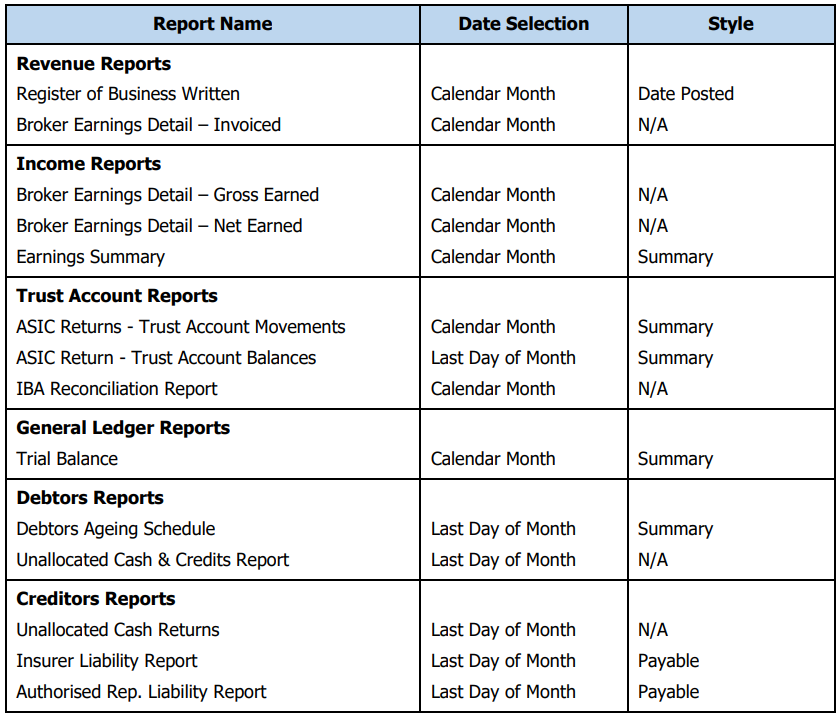
These are the recommended reports to run at month-end to verify the state of your ledger prior to closing the accounting month:
Process
 | Select Finance, then Close Accounting Month |
 | Review the accounting month to be closed, then select Close |
 | Read the confirmation message, then select Yes. |
 | Read the confirmation message, then choose Continue Closing |
 | Select Finish |
What happens next
 | INSIGHT calculates the closing total balance for the period about to be closed |
 | Populates the opening balance of the next accounting period with the closing balance of the previous period |
 | Prevent any posting of transactions to the accounting month just closed |
Was this article helpful?
That’s Great!
Thank you for your feedback
Sorry! We couldn't be helpful
Thank you for your feedback
Feedback sent
We appreciate your effort and will try to fix the article