Introduction
INSIGHT reports are grouped into different headings. The Tasks heading captures the following reports:
Diary Reminder
Task Management Report
Diary Reminder
This report is used to monitor:
The fields specific to this report are used to capture the above information. The report is available in Summary and Detail style. You can also capture policies based on Effective Date or Billing Date. To further drill down to specific categories such as Insurer, Branch, Sales Team, etc, ensure that Select All Records is set to No. | 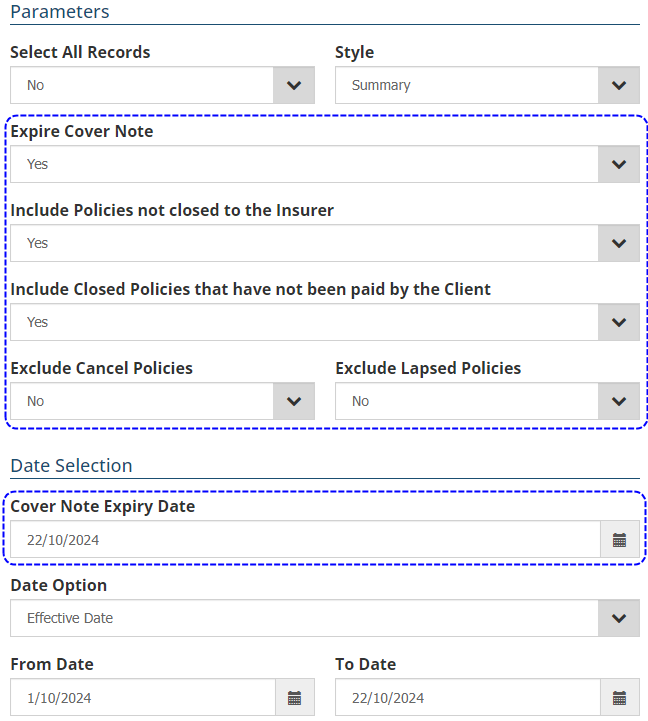 |
Task Management Report
| This report is used to monitor client, claim and policy tasks. The Summary style provides a running total of open and closed tasks based on your date selection. The Detail style provides further information such as follow-up date, class of business, queue, follow-up action, task type, open/close, priority, status, client and initiated by. | 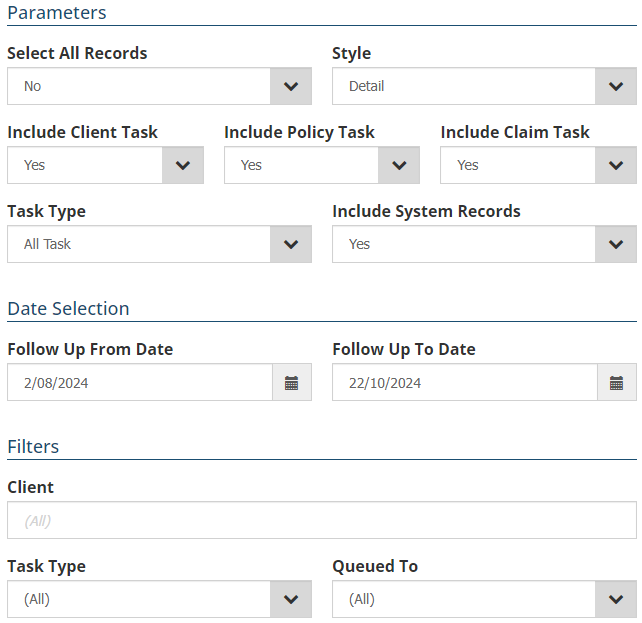 |
To further drill down to specific categories such as Client, Task Type and Queued To, ensure that Select All Records is set to No.
 IMPORTANT: Ensure that the Include System Records field is set to No so that the report only includes tasks initiated by users and excludes tasks initiated by the system.
Was this article helpful?
That’s Great!
Thank you for your feedback
Sorry! We couldn't be helpful
Thank you for your feedback
Feedback sent
We appreciate your effort and will try to fix the article