Click to go to:
Introduction
 | Your brokerage may need multiple INSIGHT ledgers to organise data in a specific manner. For example, to separate data for different states or currencies. The Ledgers tab of the Security menu is where you can track the different INSIGHT ledgers linked together. It is also a quick way to view the list of users for each ledger and what their roles are. |
 | A user can be allocated to multiple Ledgers and have different roles per ledger. |
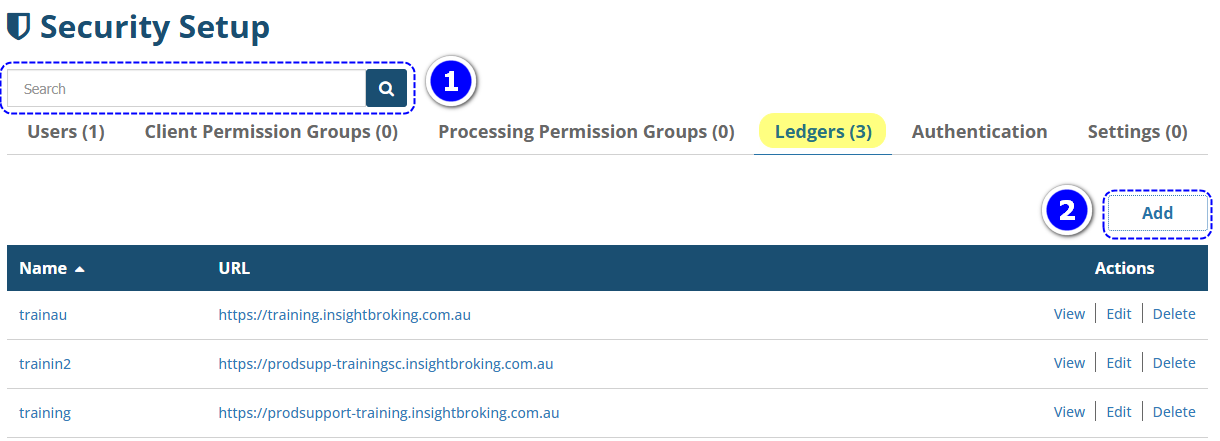
Found under the Setup menu, Security contains the list of all Ledgers linked together and is where you can add, edit or delete the link between the ledgers. You can use the following to manage the ledger list:
 | Search bar - use this to refine the list of ledgers to your search keywords. Ensure that you clear the search bar and re-select the magnifying glass, to see the full list again. |
 | Add - used to add a link to a ledger, add/remove users as members of the ledger and assign roles to ledger members. |
View, Edit & Delete
View
Used to quickly view a list of users belonging to the ledger and what the user's roles are.
 QUICK TIP: Use this to find out who the Administrators are in the ledger.
1. Select Setup, Security and Ledgers.
2. Choose the ledger you want to review and beside it, select View.
Edit
Use Edit to do the following:
- Add or remove users to an existing ledger
- Update the ledger name, URL or type
1. Select Setup, Security and Ledgers.
2. Choose the ledger you want to review and beside it, select Edit.
3. Make your changes and select Save.
 QUICK TIP: To change a user's role, first remove them from the Ledger Membership list, then select +Add User to re-add them with the correct role.
Delete
1. Select Setup, Security and Ledgers.
2. Locate the ledger you want to remove, select Delete beside it and Yes to the confirmation message.
Was this article helpful?
That’s Great!
Thank you for your feedback
Sorry! We couldn't be helpful
Thank you for your feedback
Feedback sent
We appreciate your effort and will try to fix the article