Click to go to:
Introduction
| All bank deposit slips created in INSIGHT are stored in Past Bank Deposits. Found under the Receipts menu, use this area to review and re-download bank deposit slips. | 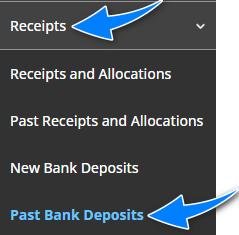 |
Process
 | Choose the date range of deposit slips you wish to review, then select Search. |
 | Choose the Deposit Slip Format you wish to produce. |
 | Select the checkbox beside the deposit slips you wish to produce. |
 | Select Download Selected as PDF or Download Selected as Excel. |
Page Breakdown
The page is divided into the top filter area and the bottom display area. The filters have default values, however, you can modify these to locate the deposit slips you wish to review. The deposit slips displayed can be sorted using the headers in the blue bar.
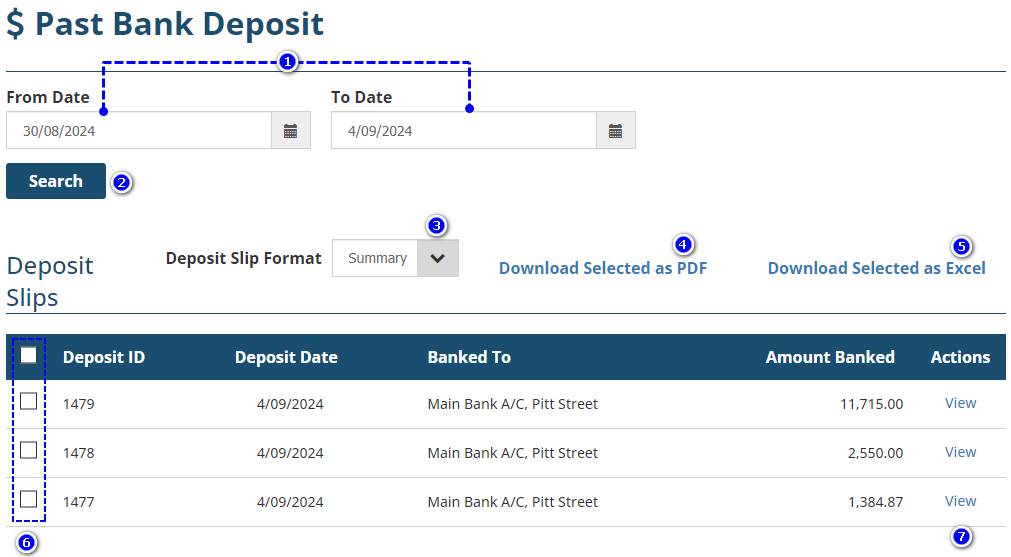
1. From Date & To Date - change these filters to suit the date range of deposit slips you wish to review.
2. Search - after changes to the filters, select Search to update the display list.
3. Deposit Slip Format - The options are Summary and Detail. Choose your desired format before downloading as PDF or Excel.
4. Download Selected as PDF - produces the selected deposit slips as PDF files.
5. Download Selected as Excel - produces the selected deposit slips as Excel files.
6. Checkboxes - you can produce more than 1 deposit slip at a time by selecting the checkboxes beside the deposit slips you wish to download. When producing
7. View - displays the date the receipt was processed in INSIGHT.
Was this article helpful?
That’s Great!
Thank you for your feedback
Sorry! We couldn't be helpful
Thank you for your feedback
Feedback sent
We appreciate your effort and will try to fix the article