Click to go to:
Introduction
Scenarios may arise when receipts must be moved from one client to another. INSIGHT uses the Client Transfer option of the Cash Journal wizard to cater for this. A sample scenario can be when a client pays one amount but has policies across various client profiles.
Process
1. Select Finance, Cash Journals, and then Client Transfer.
2. Choose Show unallocated cash and credits for a single client, enter the client name, choose the correct client, and then select Next.
3. Select the checkboxes beside the receipt or credit you want to move.
4. The Transfer Amount defaults to the receipt or credit amount, however, you can edit this amount to reflect the amount you wish to move.
5. After reviewing the list selection/s and transfer amounts, select Next.
6. Enter the client name, choose the correct client, then select Next.
7. Review the Transfer From, Transfer To and Transfer Amount details, then select Post to Accounts and Yes to the confirmation message.
8. Select Exit to move away from the wizard or Make Another Transfer to return to the start of the wizard.
What happens after?
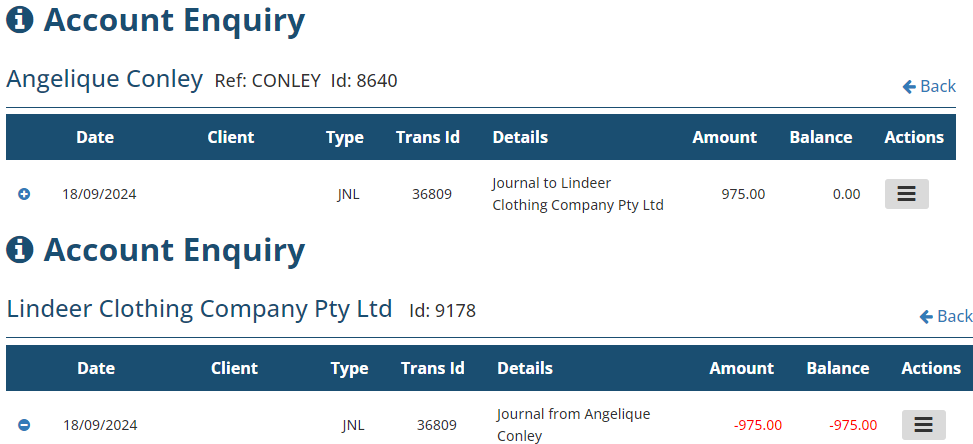
The client transfer is recorded in the respective account enquiries with the type JNL.
A sample below shows a journal of $975 from Angelique Conley to Lindeer Clothing Company Pty Ltd. The receipt/credit is now available in the recipient's account to be used to pay their invoice, journal to another client or refund to the client.
Was this article helpful?
That’s Great!
Thank you for your feedback
Sorry! We couldn't be helpful
Thank you for your feedback
Feedback sent
We appreciate your effort and will try to fix the article