Click to go to:
Introduction
INSIGHT can reverse Insurer, Authorised Rep and Client Payments, provided that the following business rules are met:
 | Users have the relevant payment permissions. |
 | A reversal can only be done once. INSIGHT will not allow a reversal of a reversal. |
 | Reversing a payment can only be done in the same accounting month the original payment was posted to. |
 | You cannot perform a reversal if a payment bank file has been created for the payment you want to reverse. |
Process
 | Select Payments and Past Payments, then use the filters to locate the payment you want to reverse (refer to the Past Payments article). |
 | Beside the payment, select Actions, then Reverse. |
 | Confirm the Accounting Month is correct and select a Reason (options are: Payment made too early and Payment made in error). |
 | Select Post to Accounts and Yes to the confirmation message. |
What happens next
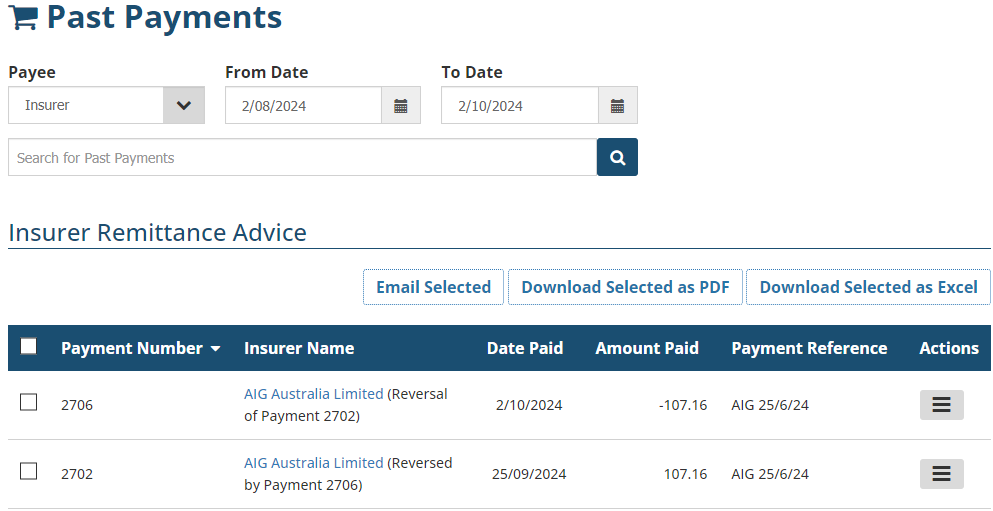
An audit trail is created in Past Payments to monitor payment reversals:
Was this article helpful?
That’s Great!
Thank you for your feedback
Sorry! We couldn't be helpful
Thank you for your feedback
Feedback sent
We appreciate your effort and will try to fix the article