Click to go to:
Introduction
INSIGHT has an SCTP Policies report that you can run to monitor your SCTP transactions. To use the report effectively, you must have an understanding of the SCTP Transaction Types or status lifecycle ranging from the following:
 | Needs Analysis - transactions where you have launched SCTP but haven't yet created a quote form |
 | Quoting - transactions where a quote form has been sent but a quote response hasn't been received; this may be due to an error or a need to resend the request. |
 | Quoted - transactions where a quote response has been received but hasn't yet been bound and invoiced. |
 | Binding - transactions where a bind request has been sent but a bind response hasn't been received; this may be due to an error or a need to resend the request. |
 | Bound - transactions that have received a bind response, but have not yet been invoiced or post to accounts in INSIGHT. |
 | Closing - transactions where post to accounts in INSIGHT has been initiated but has not yet been completed due to an error or a need to resend the closing request. |
 | Closed - transactions that have been post to accounts in INSIGHT and are finalised. |
 | Lost - transactions that have been marked as 'Quote Lost' in SCTP and have not been deleted in INSIGHT. |
Process
 | Select Reports, then SCTP Policies.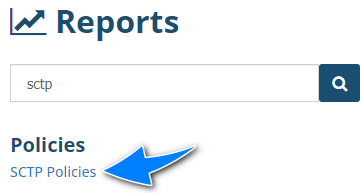 |
 | Locate the Select All Records filter and change it to No - this displays more filters for you to customise the report. |
 | Locate the SCTP Transaction Type filter and select the type you wish to review or you can leave it as (All) to see all types in one report.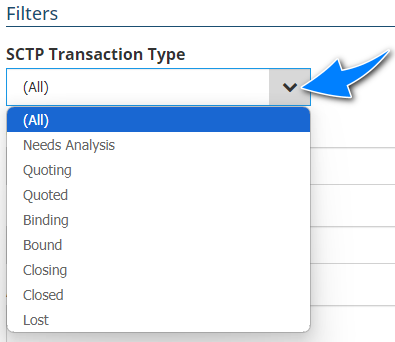 |
 | If you chose SCTP Transaction Type filter = All, you can choose the Group By filter as SCTP Transaction Type to group transactions by type to easily identify transactions that need to be updated. |
 | Choose your preferred file type, then select Run Report. |
 NOTE: The above process is a suggested approach on using the report's filters, however you can use the available filters as needed to create your own cutomised report.
Was this article helpful?
That’s Great!
Thank you for your feedback
Sorry! We couldn't be helpful
Thank you for your feedback
Feedback sent
We appreciate your effort and will try to fix the article