Introduction
Transaction wizards are tailored to serve the purpose of each transaction type, however, they do share generic & common pages regardless of the transaction type. These common pages are:
 | Policy Summary |  | AR Premiums |
 | Policy Details |  | Compliance |
 | Schedule |  | Document or Invoice Generation |
 | Invoice Premiums |  | Summary |
Invoice Premiums
The fields on this page are used to enter the premium, government charges, fees & commission information for the total of the transaction being processed.
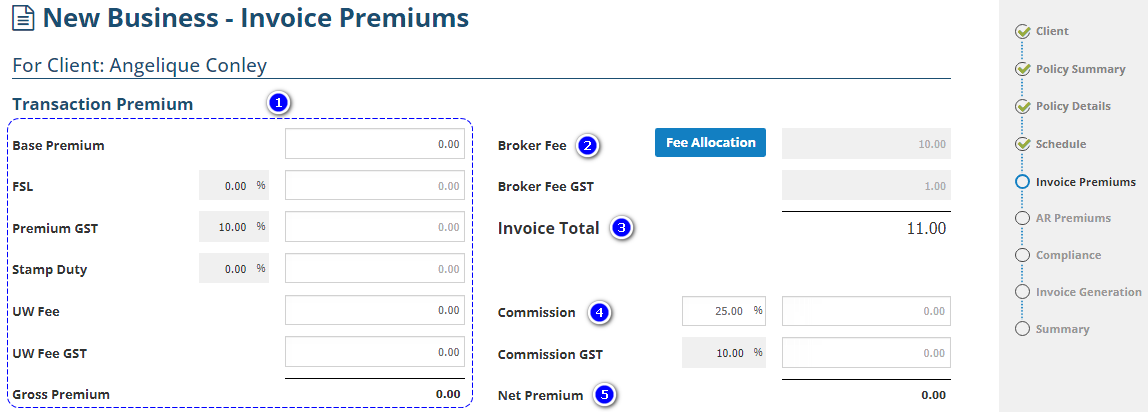
1. Gross Premium - Generally comprised of the Base Premium, FSL, Premium GST, Stamp Duty, UW Fee & UW Fee GST. All mentioned fields are free-entry, however for government charges, you also have the option to specify a percentage, then INSIGHT auto-calculates the dollar figure.
NOTE: GST percentage values for Premium, UW Fee GST, Broker Fee and Commission are preset by your Administrator and will auto-calculate the dollar figure when you enter value on the above mentioned fields.
2. Broker Fee - INSIGHT allows the addition of 3 types of broker fees. The total Broker Fee figures will be displayed on the page. To view the breakdown between different broker fees, select the Fee Allocation button.
3. Invoice Total - Displays the total amount payable by the client.
4. Commission - The commission percentage is preset by your Administrator. When modified, a warning message confirms you've deviated from the preset percentage and offers the option to return to it. If you are confident you're using the correct values & wish to proceed with the modified commission percentage, go to the next wizard page. Otherwise, kindly consult your business rules & practises before proceeding further.
5. Net Premium - Displays the amount payable to/from the insurer for this transaction. The amount will be the total invoice value, less the broker fee and commission amounts.
Was this article helpful?
That’s Great!
Thank you for your feedback
Sorry! We couldn't be helpful
Thank you for your feedback
Feedback sent
We appreciate your effort and will try to fix the article