Click to go to:
Process Sunrise Instalment Receipts
Introduction
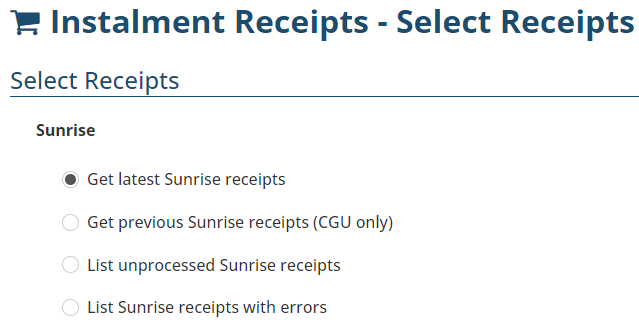
Income earned from Sunrise instalment policies is processed in the Instalment Receipts wizard. Generally done once a month, the wizard initiates an instalment receipt import from Sunrise so that the instalment policy plans are updated and you can draw your instalment income. The wizard offers several options to process Sunrise instalment receipts:
 | Get Latest Sunrise receipts | Used to import the latest payment file. |
 | Get previous Sunrise receipts (CGU only) | Only used for CGU instalment policies, use this to process new payments from a previous month that haven't been imported yet. |
 | List unprocessed Sunrise receipts | Used to reprocess Sunrise receipts that have not been processed yet. |
 | List Sunrise receipts with errors | Used to troubleshoot Sunrise receipts that have errors. |
Processing Sunrise Instalment Receipts
1. Select Receipts, then Instalment Receipts.
2. Under Sunrise, select Get latest Sunrise receipts, then Next.
3. Once imported, select the checkbox beside the receipts - only receipts with no errors are processed.
4. Select Process payments, then Yes to the confirmation message - receipts with errors or receipts that are not processed are moved to the relevant areas.
5. Review the Payment Summary page - you can also download this page as a PDF for future reference.
6. Select Exit or Make Another Instalment Payment.
IMPORTANT: Once receipts are imported, they cannot be re-imported. If for any reason, you back out of processing receipts, they can be located and processed as above by going to List unprocessed Sunrise receipts.
Troubleshooting
 | Specific to CGU instalment policies, the insurer may make previous receipts available for import - to access these, use the Get previous Sunrise receipts (CGU only) option, select the data range and process the receipts normally. |
 | Instalment receipts with errors are not processed and should be reported to the INSIGHT Support team for troubleshooting. Once investigated, you may be asked to retry processing them. You can access receipts with errors by choosing List Sunrise receipts with errors. Select the checkbox beside the relevant receipts, choose one of the below options (the Support team will advise which to choose), and then select Done to finalise the movement or removal of receipts. Options:
2. Mark Receipts Complete
|

Was this article helpful?
That’s Great!
Thank you for your feedback
Sorry! We couldn't be helpful
Thank you for your feedback
Feedback sent
We appreciate your effort and will try to fix the article