Scenario
When an invoice's payment is made to the insurer instead of the brokerage, you can update the invoice so the invoice's balance is removed.
Process
1. Go to the client's Account Enquiry.
2. Locate the invoice.
3. Go to Actions, then select Pay Direct.
4. Review the amount, then select Post to Accounts and Yes to the confirmation message.
What happens after?
A paid direct is identified in the account enquiry by P/D. When viewing an invoice's sub-transactions, you can see its balance is $0.00 and a paid direct was applied to it.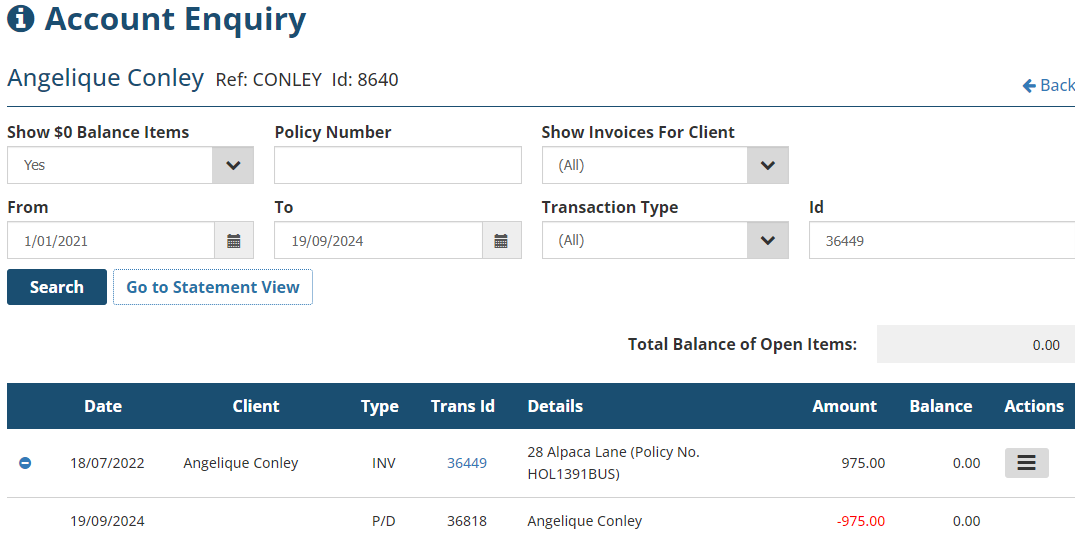
Was this article helpful?
That’s Great!
Thank you for your feedback
Sorry! We couldn't be helpful
Thank you for your feedback
Feedback sent
We appreciate your effort and will try to fix the article