Click to go to:
Introduction
 | Congratulations on becoming an INSIGHT user! |  |
You can access your user account with a username & password.
What to do?
ord Rules
- On your "INSIGHT Go Live" day, you'll be sent a welcome email that contains your username and a link to set up your password:
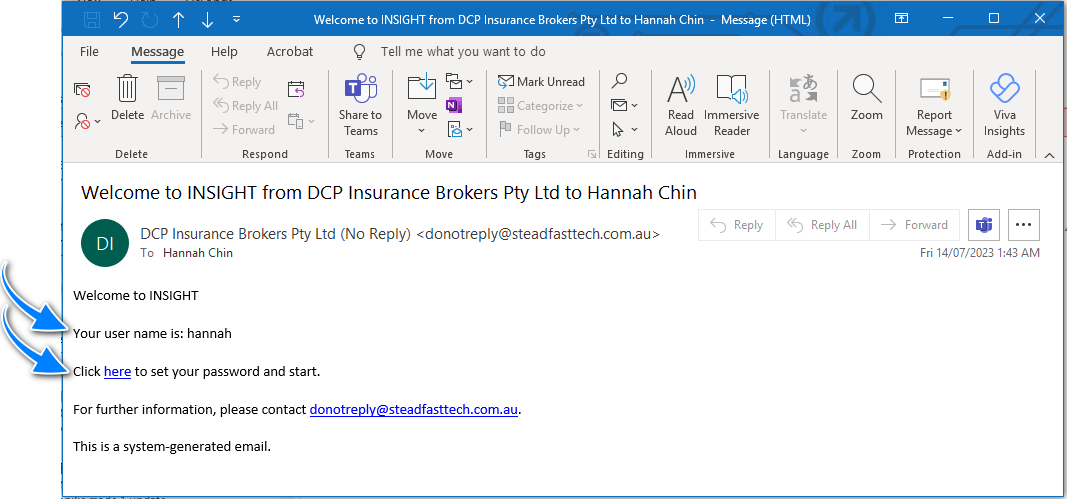
- Select the here link - this will use your default internet browser to open a page to create your own password.
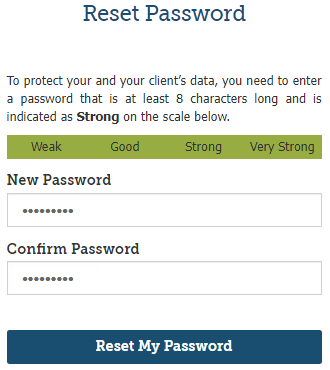
- Go to the New Password field and enter a password of your own creation.
- Go to the Confirm Password field and re-enter the same password.
 NOTE:
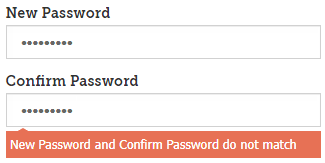
The 2 passwords must match to allow the creation of your password. Otherwise, the following message will display:
- Once the 2 passwords are entered & matched, select Reset My Password.
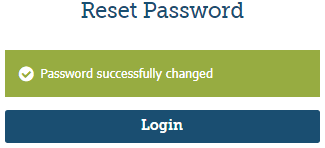
- The next page will confirm your password was successfully changed, then select Login to go to your Home page.
 QUICK TIP: Once in the Login page, bookmark this page so that you can easily access the INSIGHT Login page each time you open your browser. The method of how to bookmark will vary depending on your browser.
Password Rules
When creating your own password, please keep in mind the following rules so that the password is accepted:
- Minimum - 8 Characters
- Minimum - 1 Capital Letter
- Minimum - 1 Number
- Indicated as Strong to Very Strong on the scale

- Password must be updated every 30 days (though this is dependent on your individual site's security set-up)
Was this article helpful?
That’s Great!
Thank you for your feedback
Sorry! We couldn't be helpful
Thank you for your feedback
Feedback sent
We appreciate your effort and will try to fix the article