Click to go to:
Introduction
All .ABA files, whether created in the New Payment wizard or the Export Payment Bank File wizard, will be saved in Past Bank Payment Files. Found under the Payments menu, use this area to review or re-download .ABA files. | 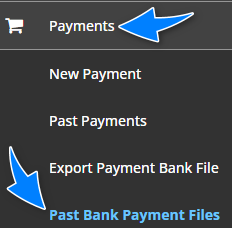 |
Searching for files
The main page is divided into 2 areas. The top area contains the From Date & To Date filters and search button. The bottom area contains the results based on the filters chosen in the top area. Anytime you change the filter selections, for example, change the From Date, you must re-select the search button to update the results in the bottom area.
Downloading a file
Once you've located the file, select Download on the right-hand side of the file to download the .ABA file into your machine.
Was this article helpful?
That’s Great!
Thank you for your feedback
Sorry! We couldn't be helpful
Thank you for your feedback
Feedback sent
We appreciate your effort and will try to fix the article