
Click to go to:
Introduction
| Works with the Client Statement - Batch Client Report when Email is chosen as the Delivery method and is used to track the email delivery statuses of the Client Statements sent immediately and sent at a scheduled date/time. This is also the page you are directed to when View Past Email Batches is selected. | 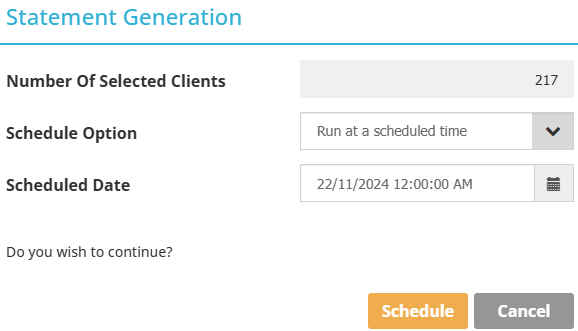 |
The page is divided into two parts: 1) The top half contains the filters and search button and 2) The bottom half displays the search results. Use the following filters to refine the search results and locate the email batches you want to review:
 | User - the default option is All which returns email batches for users with the status of Active, Inactive and Locked. Otherwise, Standard users can only select their username and Administrators can view all usernames in the list. |
 | Date Type - the options are:
|
 | From Date and To Date - determines the date range of your search |
QUICK TIP: After making changes to the filter, always select the Search button to update the search results.
Email Batch Results
The search results will initially show you the following:
|
|
|
|
|
Depending on whether the email batch was sent immediately or scheduled, the Status displayed will indicate the delivery progress:
 | Initialising - the process is still being initialised |
 | Sent - the process is completed |
 | In Progress - the process is in progress |
 | Cancelled - the scheduled email batch has been cancelled |
 | Scheduled - the batch email is scheduled to be sent at the nominated date/time |
The Actions available will depend on whether the email batch is scheduled or already sent:
- Scheduled - Actions available are View, Cancel, Reschedule, and Download as Excel.
- Sent - Actions available are View and Download as Excel.
Email Batch Details
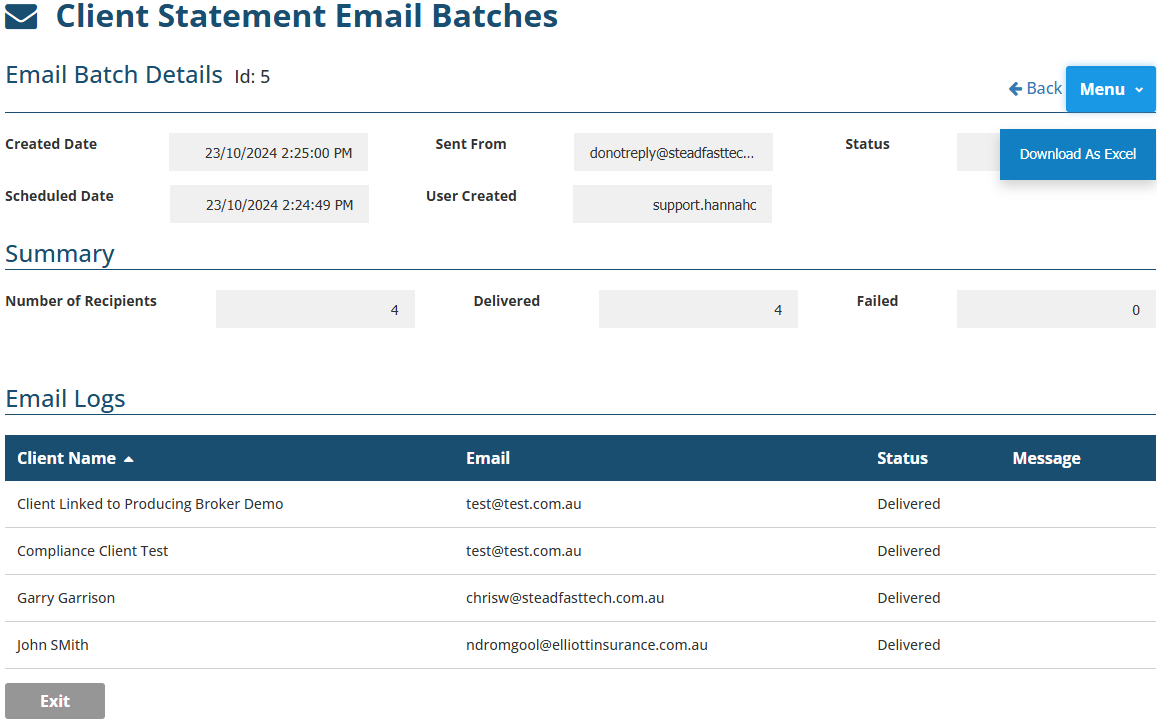
Once you select View, you will see more information regarding the email batch, such as the individual clients, client email addresses and the delivery statuses for each client.
Was this article helpful?
That’s Great!
Thank you for your feedback
Sorry! We couldn't be helpful
Thank you for your feedback
Feedback sent
We appreciate your effort and will try to fix the article